
In-App Notifications
HelpSite now supports real-time alerts inside your workspace, helping your team stay updated on important changes and requests. This is the first step toward improving collaboration within your HelpSite account.
Where to Find Notifications
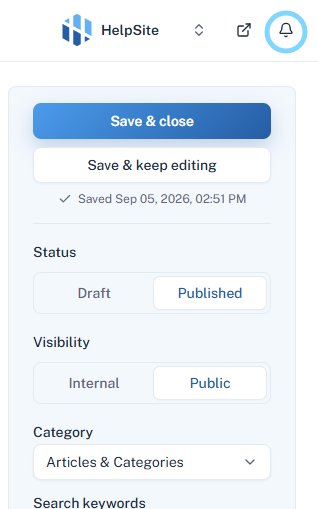
When you’re in the article editor, look for the bell icon located in the top-right corner of the screen.
This bell icon is your notifications hub and will alert you whenever there’s an update relevant to you.
How Notifications Work
Notifications appear in real time without needing to refresh the page.
-
You’ll see alerts for:
Article Assignments: When someone assigns you an article to edit or review.
Change Requests: When a teammate requests updates or edits to a specific article.
Viewing and Managing Requests
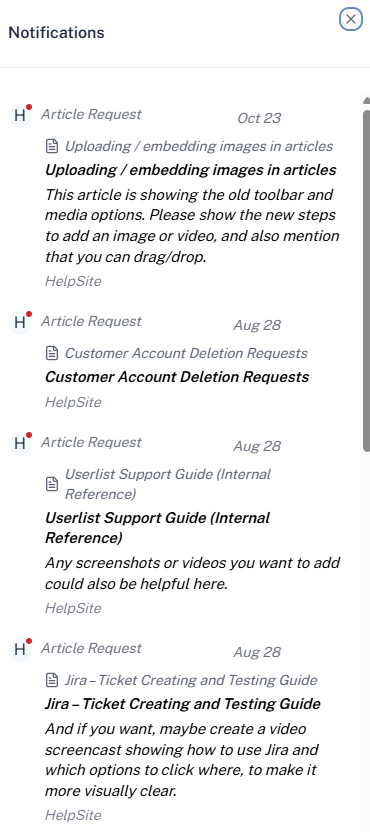
Click the bell icon to open your notifications.
-
A pop-up panel will show:
The article title
Details of the request (what needs to be changed or updated)
Who made the request
From here, you can click directly into the article to start editing or reviewing.
Good to Know
Notifications help your team coordinate edits and keep content up to date faster.
More collaboration tools are coming soon to make teamwork in HelpSite even smoother.