
Improve search results with search keywords
Search keywords are extra words you add to an article so it shows up when people search your help center for them. Add the terms readers use that aren't in the title, such as synonyms, product nicknames or common misspellings. Visitors never see them.
How do search keywords affect search?
Your help center search looks at an article's title first, then its search keywords, then its text. A match in the keywords ranks the article above articles that only mention the word in their text.
The same search suggests articles to visitors as they fill in your contact form, so good keywords also help people find an answer before they write to you.
Do search keywords help the AI Chatbot?
No. The AI Chatbot answers from the article's text, not its keywords. If a word matters for the chatbot, use it in the article itself, for example in a sentence or a heading. See Why can't the AI Chatbot find my article?
How do I add search keywords?
- Open the article in the editor.
- In the right-hand panel, find Search keywords.
- Type your keywords, separated by commas, for example
invoice, receipt, billing history. - Click Save & keep editing or Save & close (Publish & close if the article has unpublished changes).
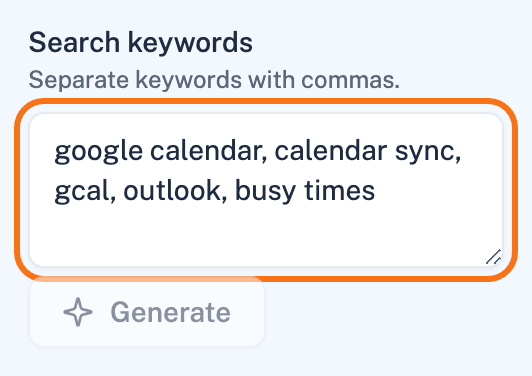
Search keywords are saved only when you click a Save or Publish button. Autosave doesn't include them.
Can HelpSite suggest keywords for me?
Yes. On a saved article with some text, click Generate under Search keywords. AI reads the article and fills in the field after a few seconds. Edit the list, then save the article.
Generate works only while the Search keywords field is empty. To generate a new list, clear the field first.
Not every plan includes generating keywords with AI. See Pricing.
What makes good search keywords?
- Words your readers use that the title doesn't, such as "refund" on an article titled "Cancel your subscription".
- Other names for the same thing, such as "login, sign in, log in".
- Four to ten terms. A long list of loosely related words pulls the article into searches where it doesn't help.