
Add a callout (note, tip, warning or danger)
A callout is a tinted box with an icon that makes one point stand out: a Note, Tip, Warning or Danger. Add one from the Callout menu in the editor toolbar, next to Quote.
Which callout type should I use?
- Note: context that changes what the reader does.
- Tip: an optional shortcut or better way.
- Warning: something that will surprise the reader or cost them time.
- Danger: an action that can't be undone, such as deleting data.
Readers often skip boxes, so keep steps and required information in the article text, and use one or two callouts at most.
How do I add a callout?
- Click in the paragraph you want in the box, or select several paragraphs or a list.
- In the toolbar, click Callout and choose Note, Tip, Warning or Danger.
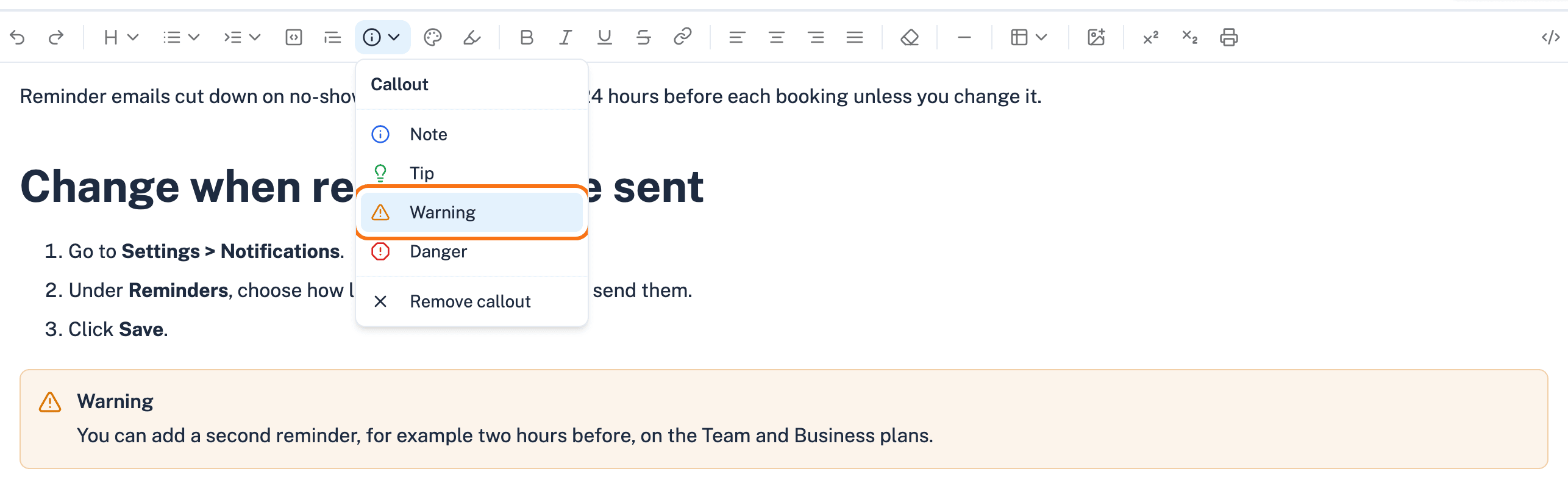
The text moves into a callout with a title line that shows the type, for example "Warning". Type your own title over it, or delete it. An empty title is hidden on your site.
How do I change or remove a callout?
- Change the type: click inside the callout, open Callout and choose another type.
- Remove it: click inside the callout, open Callout and choose Remove callout. The text stays; the box goes. A title you wrote yourself stays as a normal paragraph.
-
Leave it: press
Enteron an empty last line in the callout to continue writing below it.
Is there a shortcut?
Yes. On a new line, type [!NOTE], [!TIP], [!WARNING] or [!DANGER] and press Enter. Typing > and a space first works too, as in GitHub. [!IMPORTANT] makes a Note, and [!CAUTION] makes a Danger callout.
What can go inside a callout?
Paragraphs, lists, links, images and other formatted text. A callout can't hold another callout.
Callout text is part of the article, so your help center search and the AI Chatbot find it like any other text.
How do I write a callout through the API or MCP?
Use a div with the class hs-callout and a data-type of info (Note), tip, warning or danger. A title paragraph is optional:
<div class="hs-callout" data-type="warning">
  <p class="hs-callout-title">Refunds over $100</p>
  <p>Get approval before refunding more than $100.</p>
</div>
Callouts written this way open in the editor as normal callouts and keep their type when saved again. Markdown sent through MCP can use the GitHub alert syntax (> [!WARNING]).