
Export your site data
The Export option on the Sites tab in Settings downloads a CSV file that lists the sites in your account with their article and category counts. It doesn't include article content. For that, use the API or ask our support team.
How do I export my list of sites?
In the sidebar, click Settings, then the Sites tab. You can also open the site switcher at the top of the sidebar and select Manage Sites.
Next to any site, click the three-dot menu (⋮).
-
Select Export.
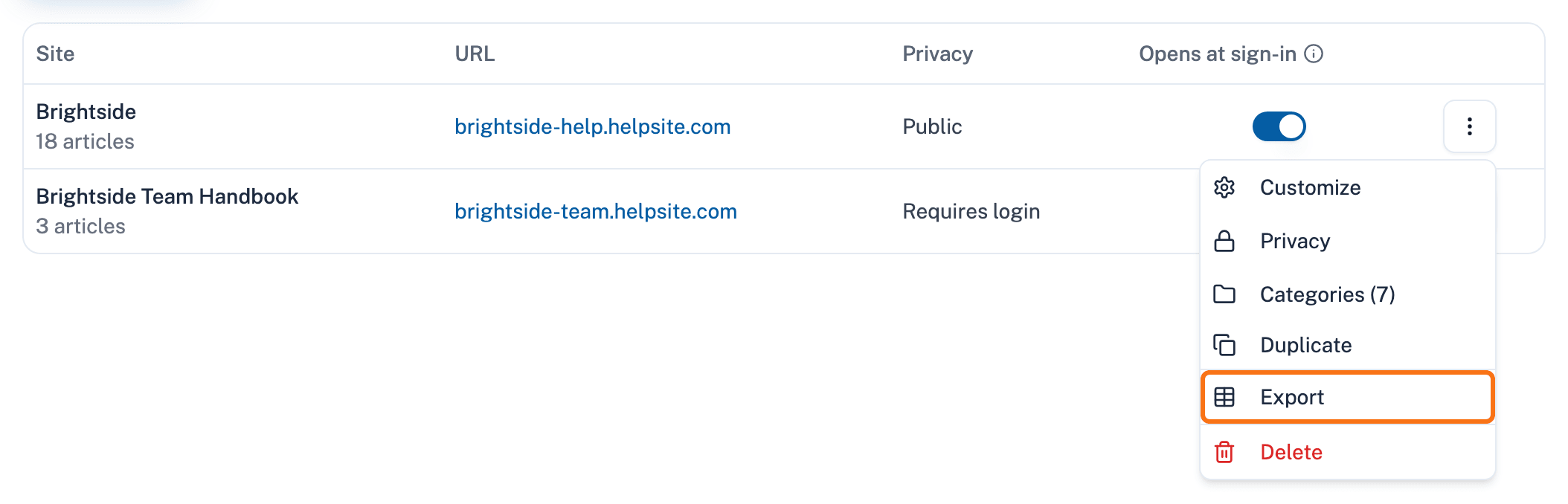
A file named sites- followed by the date and time downloads. It lists every site you can see, whichever row you exported from, with these columns:
ID
Title
Subdomain
Articles Count
Categories Count
How do I get a copy of my article content?
There are two ways.
Use the API or MCP. The HelpSite REST API and MCP server can read every article in a site, including its text. You need an API key first. See Create an API key, then Use the HelpSite REST API or Connect Claude, ChatGPT, Cursor or another AI tool with MCP.
Ask our support team. Email help@helpsite.com with the site you need. We can send its articles as a CSV file, or a copy of the public help center as HTML pages in a ZIP file. The download link we email works for 7 days.
Not every plan includes API access. See Pricing.
Does HelpSite back up my data?
Yes. HelpSite takes its own regular, automatic backups of all data so it can recover from a disaster. Learn more in How HelpSite keeps your data secure.